> ## Documentation Index
> Fetch the complete documentation index at: https://docs.trady.xyz/llms.txt
> Use this file to discover all available pages before exploring further.
# Token Page
> Command center for one token: chart, trade panel, holders, dev history and every rug-check variable on one screen.
Command center for one token: chart, trade panel, and every variable you'd otherwise check across five tools. The goal is simple — **no tab-switching to vet a coin.**
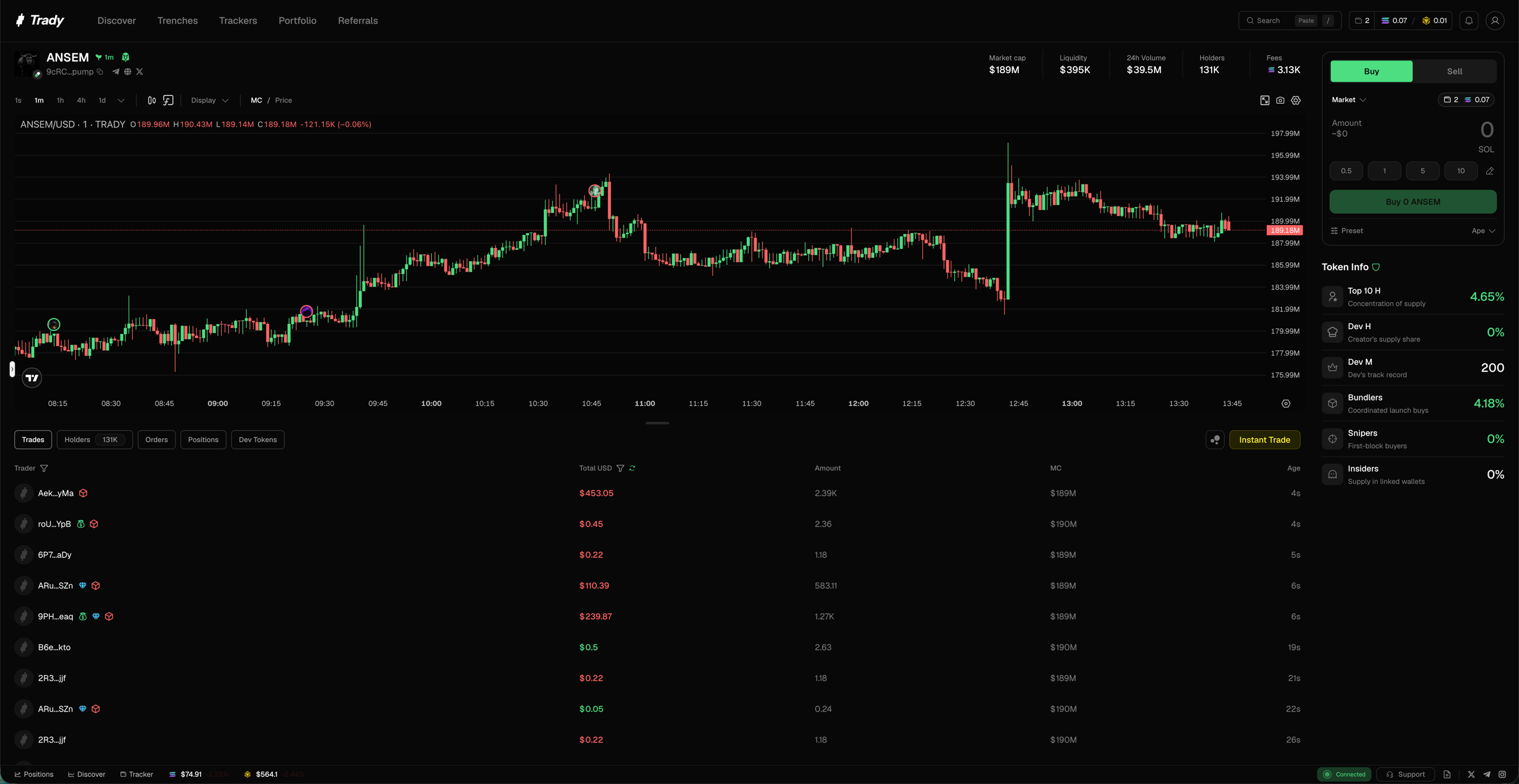 ## Hero bar
The vital signs across the top:
* **Pair info** — token, ticker, chain, pool
* **Market cap** and **price** — with 24h change
* **Volume** — is anyone actually here?
* **Liquidity** — can you get out at size?
* **Holders** — how many, growing or bleeding
* **Fees** — fee flow from the token's trading. Real volume produces proportional fees; a huge "volume" number with pocket-change fees is a painted chart
## Token info
The vet-before-you-ape block:
* **Top 10 holders %** — share held by the top 10 wallets
* **Dev holding %** — how much the creator kept
* **Bundlers %** — supply sitting in coordinated wallets
* **Snipers %** — supply grabbed in the first blocks
* **Insiders %** — wallets linked to the deployer
Red flags are highlighted. What each threshold means and when to walk away: [Reading a Token Page](/learn/reading-a-token-page).
## Chart
Full candlestick chart with drawing tools and indicators. Limit orders you place appear as lines on the chart. {/* TODO(team): confirm chart features (drag-to-edit orders?) */}
## Trade panel
Buy/sell without leaving the page — market, [limit (TP/SL)](/trading/limit-orders), or [instant](/trading/instant-trade-quick-buy-sell), with your [transaction settings](/trading/transaction-settings) one click away.
## Bottom tabs
| Tab | What's inside |
| -------------- | ----------------------------------------------------------- |
| **Trades** | Live tape — every buy/sell, size, wallet |
| **Holders** | Full holder list with % of supply and wallet flags |
| **Orders** | Your open limit orders on this token |
| **Positions** | Your position: entry, size, PnL |
| **Dev tokens** | Every other token this deployer has launched, with outcomes |
## The 30-second vet
Before any entry: (1) hero bar — liquidity real, fees proportional to volume; (2) Token info — top 10 ex-LP sane, dev holding modest, bundlers under \~15%, snipers not stacked; (3) Dev tokens — serial rugger or first-timer; (4) Trades — organic two-way flow, not bot staircase. Ten seconds each. The full checklist with thresholds: [Rug-Check Basics](/learn/rug-check-basics).
## Mini-FAQ
**The metrics look clean — so it's safe?**
Clean numbers mean the *checkable* things check out. They can't see intentions: a clean contract with hidden coordinated supply is still a controlled dump waiting to happen. Numbers + dev history + the tape together, always.
**Why does the top holder show a huge %?**
Check whether it's the LP/pool address — interfaces list it among holders, but it's not a trader. {/* TODO(team): confirm LP labeling in holders tab */}
## Hero bar
The vital signs across the top:
* **Pair info** — token, ticker, chain, pool
* **Market cap** and **price** — with 24h change
* **Volume** — is anyone actually here?
* **Liquidity** — can you get out at size?
* **Holders** — how many, growing or bleeding
* **Fees** — fee flow from the token's trading. Real volume produces proportional fees; a huge "volume" number with pocket-change fees is a painted chart
## Token info
The vet-before-you-ape block:
* **Top 10 holders %** — share held by the top 10 wallets
* **Dev holding %** — how much the creator kept
* **Bundlers %** — supply sitting in coordinated wallets
* **Snipers %** — supply grabbed in the first blocks
* **Insiders %** — wallets linked to the deployer
Red flags are highlighted. What each threshold means and when to walk away: [Reading a Token Page](/learn/reading-a-token-page).
## Chart
Full candlestick chart with drawing tools and indicators. Limit orders you place appear as lines on the chart. {/* TODO(team): confirm chart features (drag-to-edit orders?) */}
## Trade panel
Buy/sell without leaving the page — market, [limit (TP/SL)](/trading/limit-orders), or [instant](/trading/instant-trade-quick-buy-sell), with your [transaction settings](/trading/transaction-settings) one click away.
## Bottom tabs
| Tab | What's inside |
| -------------- | ----------------------------------------------------------- |
| **Trades** | Live tape — every buy/sell, size, wallet |
| **Holders** | Full holder list with % of supply and wallet flags |
| **Orders** | Your open limit orders on this token |
| **Positions** | Your position: entry, size, PnL |
| **Dev tokens** | Every other token this deployer has launched, with outcomes |
## The 30-second vet
Before any entry: (1) hero bar — liquidity real, fees proportional to volume; (2) Token info — top 10 ex-LP sane, dev holding modest, bundlers under \~15%, snipers not stacked; (3) Dev tokens — serial rugger or first-timer; (4) Trades — organic two-way flow, not bot staircase. Ten seconds each. The full checklist with thresholds: [Rug-Check Basics](/learn/rug-check-basics).
## Mini-FAQ
**The metrics look clean — so it's safe?**
Clean numbers mean the *checkable* things check out. They can't see intentions: a clean contract with hidden coordinated supply is still a controlled dump waiting to happen. Numbers + dev history + the tape together, always.
**Why does the top holder show a huge %?**
Check whether it's the LP/pool address — interfaces list it among holders, but it's not a trader. {/* TODO(team): confirm LP labeling in holders tab */}