> ## Documentation Index
> Fetch the complete documentation index at: https://docs.trady.xyz/llms.txt
> Use this file to discover all available pages before exploring further.
# Instant Trade, Quick Buy & Quick Sell
> One-click execution with pre-configured settings, wherever you hunt: the trade page, Discover, Search and Trenches.
When the meme is moving, the trade panel is friction. These three tools compress find → execute to a single click.
## Instant Trade
One-click execution with pre-configured settings. You define the recipe once — amount, slippage, priority fee, MEV mode — and every Instant Trade fires with it, skipping the review screen.
**Setup:**
1. On the **Trade** page, hit the **Instant Trade** button.
2. Configure the recipe right in the Instant Trade window: amount + a [transaction preset](/trading/transaction-settings) (Chill / Rush / Ape / Custom).
3. From now on, one click = one executed trade with those settings.
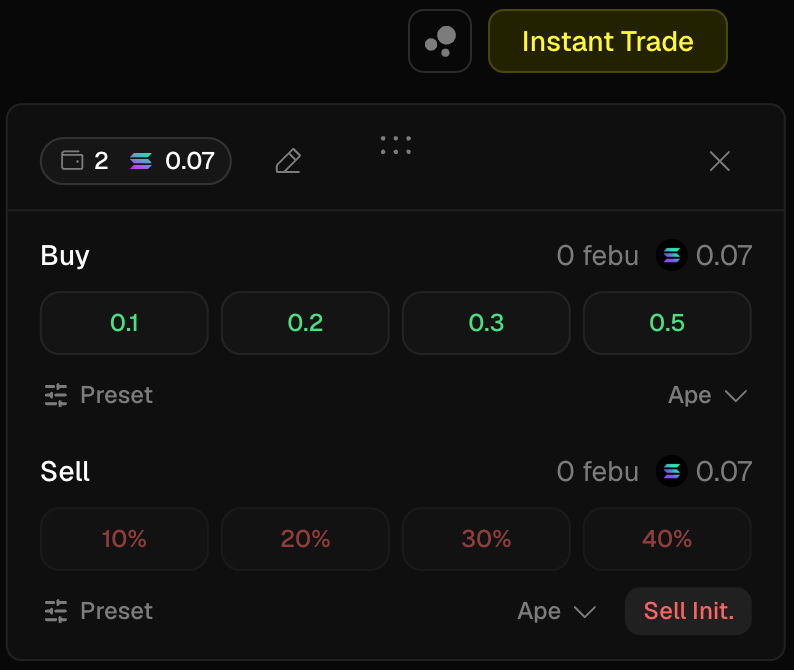 Same security checks and MEV protection as regular orders — you're skipping the *review*, not the *protection*.
**Use it when** you're working the trenches and the difference between 4 seconds and 1 second is the difference between a good entry and someone else's exit. **Don't use it** as a default for size — the review screen exists for a reason.
## Quick Buy
Buy buttons embedded where you hunt — [Discover](/discovery/discover), **Search**, and [Trenches](/discovery/trenches). See a signal, act on it, without navigating to the token page first.
Preset amounts and settings are configured directly in the Quick Buy widget. Set them once, fire from any feed.
## Quick Sell
The same, in reverse — sell buttons on your positions wherever they show up: portfolio rows, token pages. Preset sell fractions mean cutting a position takes one click, not four:
* **25% / 50% / 100%** — fraction of the position
* **Sell init** — sell exactly your initial investment. The position that's left is pure house money — the single best anti-roundtrip button in the terminal. 2x'd and screenshotting for the group chat? That's the click.
Speed on exits matters more than speed on entries: opportunities are abundant, but a rug gives you one narrow window to leave.
## Mini-FAQ
**What's the difference between Instant Trade and Quick Buy?**
Same engine, different placement. Instant Trade is the one-click mode on the Trade page; Quick Buy lives in Discover, Search, and Trenches.
**Can I set different preset amounts per context?**
Yes — presets are configured in each widget: the Instant Trade window, the Quick Buy widget, and the order widget each hold their own settings.
**Instant Trade feels dangerous. Is it?**
It removes the confirmation step — that's exactly the trade-off. Keep the preset amount at a size where a fat-fingered click is annoying, not portfolio-ending.
Same security checks and MEV protection as regular orders — you're skipping the *review*, not the *protection*.
**Use it when** you're working the trenches and the difference between 4 seconds and 1 second is the difference between a good entry and someone else's exit. **Don't use it** as a default for size — the review screen exists for a reason.
## Quick Buy
Buy buttons embedded where you hunt — [Discover](/discovery/discover), **Search**, and [Trenches](/discovery/trenches). See a signal, act on it, without navigating to the token page first.
Preset amounts and settings are configured directly in the Quick Buy widget. Set them once, fire from any feed.
## Quick Sell
The same, in reverse — sell buttons on your positions wherever they show up: portfolio rows, token pages. Preset sell fractions mean cutting a position takes one click, not four:
* **25% / 50% / 100%** — fraction of the position
* **Sell init** — sell exactly your initial investment. The position that's left is pure house money — the single best anti-roundtrip button in the terminal. 2x'd and screenshotting for the group chat? That's the click.
Speed on exits matters more than speed on entries: opportunities are abundant, but a rug gives you one narrow window to leave.
## Mini-FAQ
**What's the difference between Instant Trade and Quick Buy?**
Same engine, different placement. Instant Trade is the one-click mode on the Trade page; Quick Buy lives in Discover, Search, and Trenches.
**Can I set different preset amounts per context?**
Yes — presets are configured in each widget: the Instant Trade window, the Quick Buy widget, and the order widget each hold their own settings.
**Instant Trade feels dangerous. Is it?**
It removes the confirmation step — that's exactly the trade-off. Keep the preset amount at a size where a fat-fingered click is annoying, not portfolio-ending.