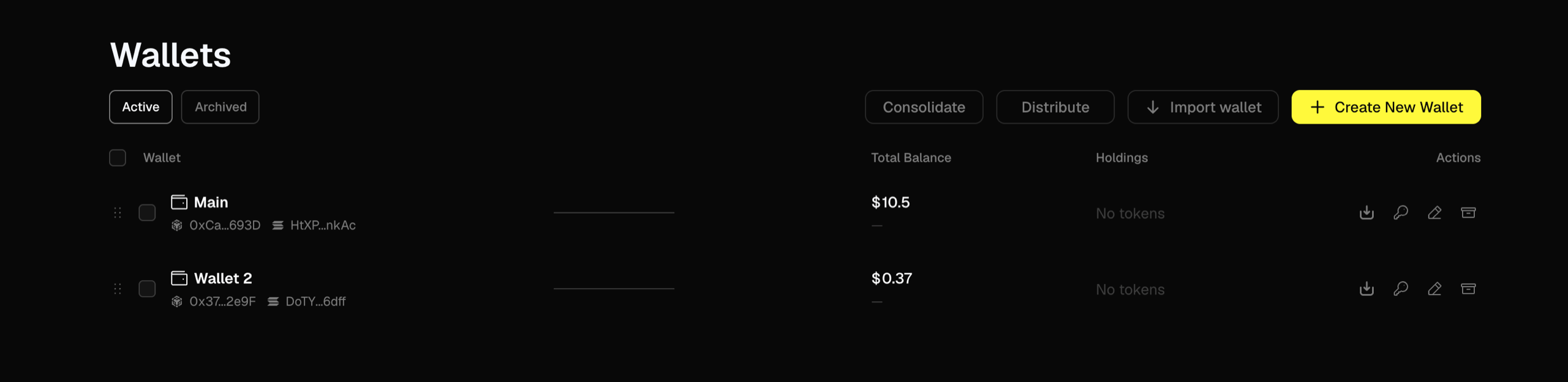
Trady creates a Solana and an EVM wallet at signup. Add more when you want separation — a runner wallet, a farm wallet, one you never connect to anything.
Why run multiple wallets
- Strategy separation — one wallet for trench scalps, one for holds. Keeps PnL honest per strategy.
- Privacy — everything one wallet does is public and linkable. Splitting activity raises the cost of tracking you.
- Risk containment — a wallet that interacts with sketchy contracts shouldn’t be the wallet holding your stack.
Managing wallets
Open Wallets to:
- Create a new wallet on any supported chain.
- Import an existing wallet by private key — see Custody, Key Export & Import.
- Label wallets (“main”, “trench”, “hold”) — labels are local to your account, never public.
- Switch the active trading wallet from the top bar in one click.
- Consolidate & Distribute funds between your wallets on the same chain.
- Export any wallet’s private key at any time.
Note: transfers between wallets are same-chain only — Solana wallets move funds between each other, EVM wallets between each other. To move value between chains, use the built-in bridge — see Balances & Bridge.
The golden rule of wallet hygiene
Your trading wallet is for trading on Trady. Don’t connect it to mint sites, airdrop claims, or “check if you’re eligible” pages. Use a separate, minimally-funded wallet for navigating the wider chain. Drainers don’t need your seed phrase if you sign the wrong approval yourself.
Frequently asked questions
Does each wallet have its own fee tier?
No — tiers are per account. Volume from all your wallets counts toward the same 30-day total.
Can other people see my wallet labels?
No. Labels are display-only, inside your account.
I imported a wallet — can Trady see its history?
No — importing a wallet just lets Trady sign for it when you trade. Trady doesn’t pull in the wallet’s past on-chain history; what it did before you imported it isn’t tied to your account. Last modified on August 18, 2026