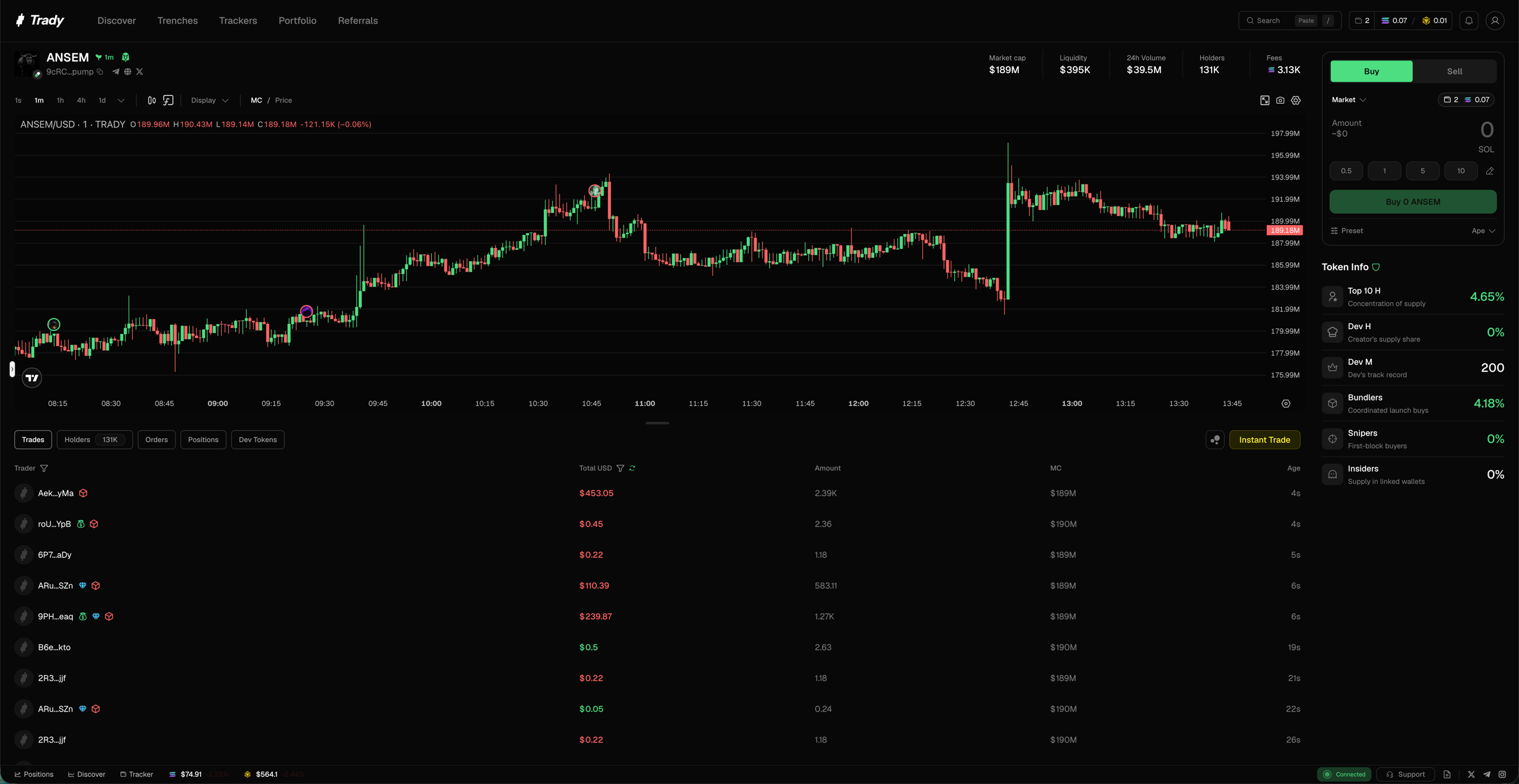
Everything tradable, one window. Trady gives you one interface and one click between “saw it” and “own it” — on Solana, BNB Chain and Robinhood Chain today, more chains soon.
The Trade page
Everything about a token and the trade lives on one screen — chart, execution, and the data you’d otherwise open five tabs to check.
Hero bar
The vital signs, always visible on top:
- Pair info — token, ticker, chain, pool
- Market cap and price
- Volume — is anyone actually here?
- Liquidity — can you get out at size?
- Holders — how many, growing or bleeding
- Fees — fee flow generated by the token’s trading; real volume produces proportional fees, painted volume doesn’t
Token info
The vet-before-you-ape block:
- Top 10 holders % — concentration at a glance
- Dev holding % — how much the creator kept
- Bundlers % — supply in coordinated wallets
- Snipers % — supply grabbed in the first blocks
- Insiders % — wallets linked to the deployer
What the thresholds mean: Reading a Token Page.
Bottom tabs
Full breakdown: Token Page.
Execution, in short
- Fast and stable. Execution is tuned for the trenches — quotes from live liquidity, smart routing, confirmation the moment the trade lands. See Transaction Lifecycle.
- Multi-chain without leaving the app. Stable balances per chain plus a built-in one-click bridge between them (0.50%, min $0.50) — no external bridge tabs. See Balances & Bridge.
- Configurable. Slippage, priority fees, MEV protection — presets (Chill / Rush / Ape / Custom) or full manual control. See Transaction Settings.
One honest note on speed
Speed is edge, and Trady optimizes for it relentlessly — but no terminal beats physics. If a token’s chart went vertical 30 seconds ago, the fastest execution in the world is still a FOMO entry. The tools reward traders who arrive early, not ones who click hardest late. See Learn.
Fees
One number to remember: 1.00% per trade at entry tier, falling to 0.70% with volume, minimum $0.10 per trade. No hidden spreads, no fee stacking. Full breakdown with examples: Fees & Tiers.
Frequently asked questions
What order types does Trady support?
Market orders for immediate execution, limit orders as take-profit and stop-loss triggers, plus Instant Trade and Quick Buy/Sell for one-click execution from any feed. Trady does not offer a “buy the dip” trigger.
Can I trade every supported chain from one account?
Yes. All supported chains run in the same interface, with a stable balance held per chain and cross-chain moves handled in-app. No external bridge sites are involved. See Balances & Bridge.
How much does Trady charge per trade?
1.00% per trade at entry tier, falling to 0.70% as 30-day volume grows, with a minimum of $0.10 per trade. No hidden spreads and no fee stacking. See Fees & Tiers.
Does faster execution guarantee a better entry?
No. Execution speed is an edge, but no terminal beats physics — if a chart went vertical 30 seconds ago, the fastest fill available is still a FOMO entry. Speed rewards traders who arrive early, not those who click hardest late. Last modified on August 18, 2026