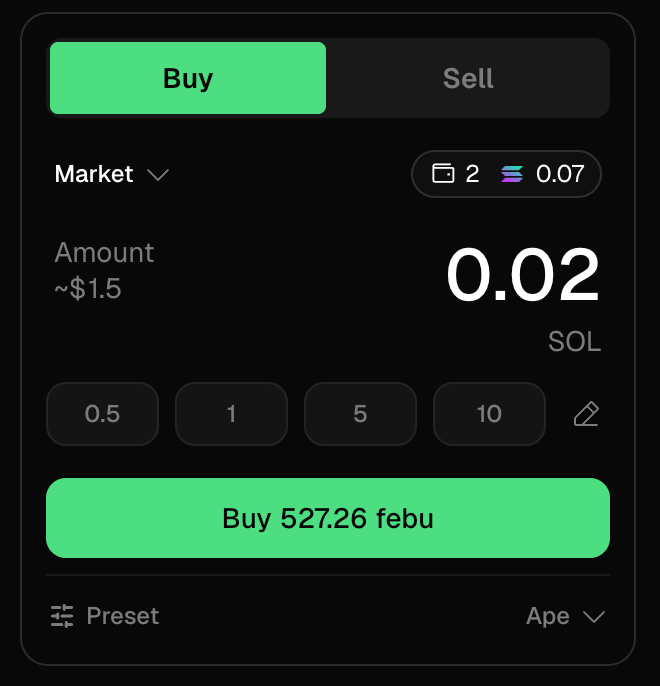
This is the order type most of your trades will use: you name the size, Trady routes it, and it fills against whatever liquidity exists at that moment.
How do I place a market order on Trady?
- Open a token page (search, Discover, or Trenches).
- In the trade panel, pick Buy or Sell.
- Enter the amount — in the chain’s stable balance, in its native token, or as a % of your position when selling. Presets speed this up (see Filters & Presets).
- Check the quote: expected tokens received, price impact, network cost, total.
- Click Buy/Sell. Done — the position appears in Portfolio.
What happens to my order after I submit it?
- Smart routing. The engine checks available liquidity and routes the trade for the best executable price — splitting across pools when it improves the fill on size.
- Per-chain balances. Buys draw from the stable balance of the token’s chain. Balance sitting on another chain? Bridge it in one click (0.50%, min $0.50) — see Balances & Bridge.
- Protection along the way. Your Transaction Settings — slippage cap, priority fee, MEV protection — apply to every market order.
How does slippage affect a market order?
Memecoin pools are shallow; the price moves between your click and your fill. Your slippage setting is the worst fill you’ll accept. Too tight on a volatile token → the trade reverts and you miss the move. Too loose → you become someone’s exit liquidity via a sandwich. Defaults are sane; understand them before sizing up: Slippage, Priority Fees & MEV.
Frequently asked questions
Why did I receive fewer tokens than quoted?
The quote is a snapshot; the fill happens at execution. Difference within your slippage cap is normal on volatile tokens. Beyond the cap, the trade reverts instead of filling.
Why did my market order fail?
Usually slippage exceeded, insufficient gas token, or the pool moved too fast. Full decision tree: Failed Transactions.
Is there a max order size?
No hard cap — but on thin pools, you are the price impact. The quote screen shows it before you commit. Last modified on August 18, 2026